Meetings
Notes that turn into work.
- Click a meeting to open its notes right on the day
- ⌘⇧A turns the line you’re on into a task
- Raw while you type, Clean once it’s tidy
Tasks 1
Day & Note
AlphaMeetings, tasks and notes, split by project. Whatever you didn’t finish yesterday is already waiting today.
Day & Note is a desktop app for Mac and Windows. Send yourself the link to install it there.
Day & Note puts the whole day on one page, and carries over what you didn’t finish.
New Google Calendar
Connect Google Calendar once and every day opens with its meetings in place, each with a notes page waiting. No copying times across, no second window. Flip the switches below.
Settings Calendar
Show on my days
Read-only. Nothing is written back to Google.
Sunday, October 25
Meetings 5
Synced just now
Read-only
It reads your events. It never creates, changes or deletes one.
Your pick of calendars
Work on, company events off. Only the calendars you choose show up.
Private either way
On your computer, events stay there. With cloud sync, titles, your account and the token are sealed first.
Notes before the call
Every meeting gets a notes page on its day, ready when you click it.
Free in the alpha: Settings → Calendar → Connect. How we handle Google data
How it works
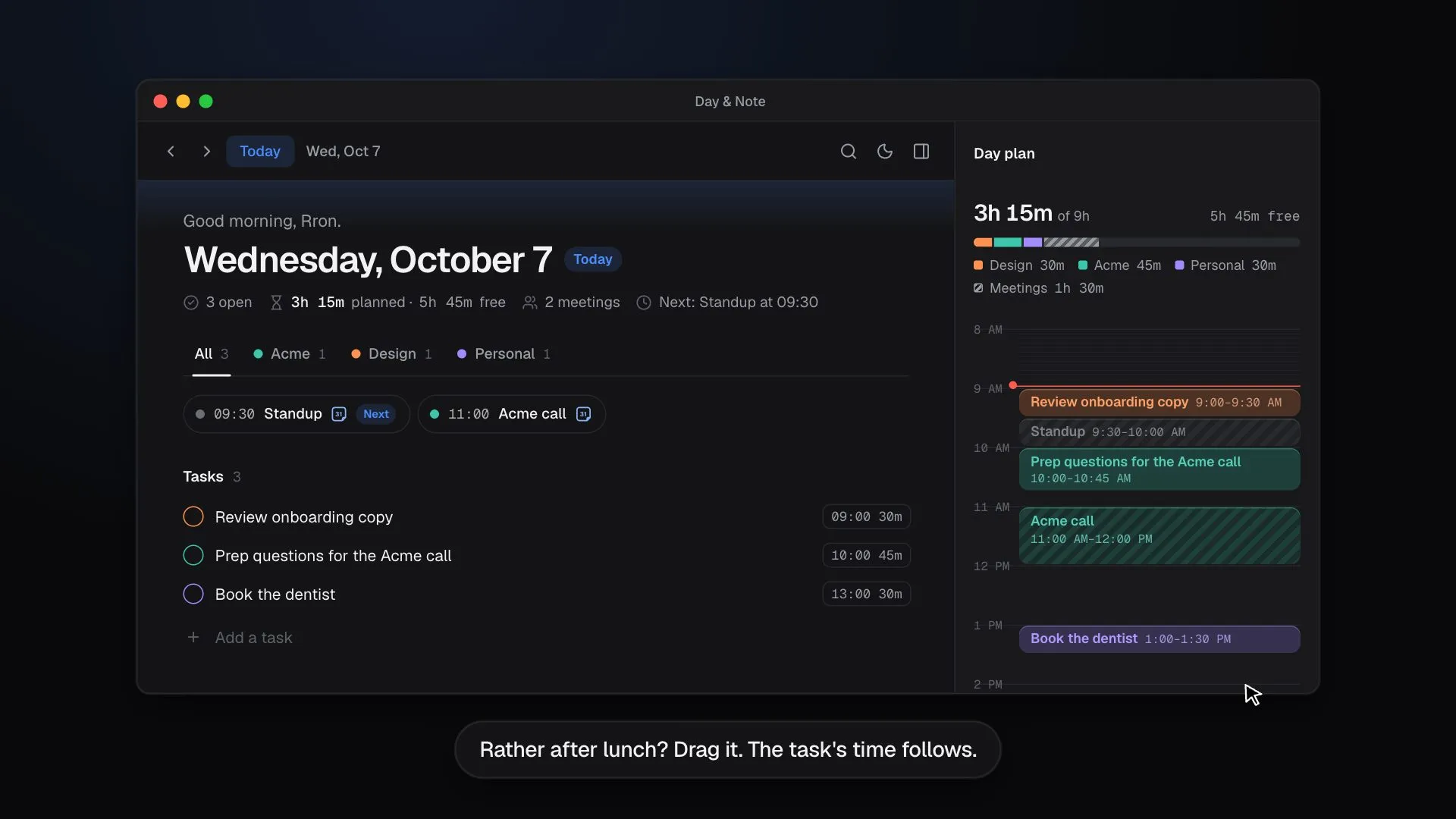
The date is the headline. Meetings sit at the top, then your tasks, and the rest of the page is yours to write in. Try the pieces below; they work like the app.
Meetings
Tasks 1
Now line New
Good morning.
3 tasks open. Press ▶ on one to start.
Tasks
Images New
Launch checklist
Mia’s final hero, approved this morning:
Ship once Safari matches.
Carry-over
From earlier 3
Projects
Notes for the day
Focus: roadmap before lunch, then the pricing page.
Day plan
Project pages
Acme
On this computer, sealed with your key
Search
And the rest
Keep yesterday, or any day, in a small card while you work on today.
Pin up to six projects, tasks or meetings to a floating dock.
Meeting notes or the day’s writing, alone on the screen.
Paste Markdown and get headings, lists and checkboxes.
Every shortcut can be changed, and clashes are caught for you.
Follows your system, with a switch in the top bar.
One client, several apps, each with its own links and Kit.
Signed updates download quietly. You just click Restart.
Keyboard first
Every list ends in an input and Enter saves. Tab nests, ⌥⇧↑ moves a line. And
every shortcut is yours to change.
Quick add
Press ⌃⌘Space in any app and a small panel drops in over it. Type the task, Tab for a note, ⌘↵ and it’s on today and the panel is gone. You never leave what you were doing.
Animation: in a browser, a mail app and a chat app, pressing Control, Command and Space opens the Day & Note quick-add panel. A task and a note are typed, Command and Return add them to today and close the panel.
The dock
Pin the projects, tasks and meetings you go back to all day. They float at the bottom of the window, a meeting counts down as it gets close, and a task ticks off without leaving the dock. Same dock on a Mac or a PC.
Try it: open a pin, or drag one somewhere else
Private by default
Day & Note starts with your notes in a folder on your computer: no account, no internet, nothing on our servers. Want them on every device? Turn on cloud sync, and everything is end-to-end encrypted before it leaves. Switch any time, nothing is lost.
Your days are saved in ~/Day & Note: one database file, your images and
a daily backup. It opens instantly, works on a plane, and you can copy, move or back it
up like any other folder.
No account
No email, no passphrase. Download it and start.
No internet needed
Write, plan and search with no connection.
Nothing on our servers
What you write never leaves your computer.
Backed up daily
A copy of each of the last 7 days, in the folder.
Everything you write is sealed on your computer before it syncs, and the server only ever stores ciphertext. Your passphrase never leaves the device, so nobody else can read your days: not us, not our host, not anyone who breaks into the server.
Never sees
Still sees
Lose both your passphrase and your recovery code and the data is gone for good. There’s no back door to reset it.
Switch any time in Settings. A move only finishes once every note is checked on the other side, so nothing gets lost on the way. Read the full policy.
Fast and light
A native app that stays light on the machine. It uses next to no CPU while it sits open all day, and every change is held to these budgets.
macOS download 9.3 MB, universal for Apple Silicon and Intel.
In the lab · Day & Note AI
Something is learning to read your days, so you don’t have to. That’s all we’re saying for now.
Off until you turn it on, and you choose what it reads. Everything in the app today stays free.
Download
Free, and in alpha. Version 1.28.0, released Oct 25, 2026. It keeps itself up to date after that.
Day & Note is a desktop app for Mac and Windows. Send yourself the link to install it there.
.dmg
9.3 MB
Download for macOS
Your system
Windows
Windows 10 and 11 · 64-bit · no admin rights needed
.exe installer
3.3 MB
Download for Windows
Your system
No account. Not even an email.
Download it and start your day. Your notes are saved in a folder on your computer, and nothing you write goes to our servers.
Want them on another device? Turn on cloud sync any time and everything comes with you.
On your computer, your notes are as safe as the computer. The app keeps a backup from each of the last 7 days in the folder, and you can export everything whenever you like.
With cloud sync on, everything you write is end-to-end encrypted on your device before it leaves. We can’t read it. Read the details
On Linux? Get the AppImage (updates itself) or the .deb.
The app isn’t signed by Apple or Microsoft yet, so your system asks you to confirm once. It takes a minute.